How To Print Quality Photos At Home
Printing photos have become popular again in recent years. The average phone camera has enough quality under good conditions that most people don’t need a big camera in many cases.
As family photographers we’ve spent a lot of time learning how to print. So let us show you points to look out for and how to get the best out of your own photos.
How Good Are Phone Cameras Now?
Generally speaking in daylight conditions the sensor in a flagship phone camera exceeds the performance of a 15 year old DSLR and may match the performance of a 10 year old DSLR. In all but very dark indoor conditions your phone is perfectly capable of producing printable shots.
This is really amazing, because the phone sensor is just 1/40th of the size of a DSLR sensor.
How To Set Your Phone Camera Settings
Most phones allow you to set different ratios to photos captured. They may be listed like 3:4, 16:9, etc. To get the best quality, look up your manual and choose the ratio that uses the whole sensor.
Avoid using digital zoom. It’s not actually zooming, just stretching your photo with software. You’d have better results doing it yourself afterwards if needed.
How Big Should My Photos Be?
This is a common question, because some printers state you can only print a photo if it’s a certain size in MB.
This is completely wrong. It’s like ordering food in a restaurant and asking how heavy the plate is. Shouldn’t you care about the food instead?
Most print shops take files in JPG format. It’s a compressed format, which means the size in MB varies depending on the content of the photo.
The real measure of the size of a photo is the resolution. Eg 2000×3000 pixels. If it’s a photo of a pure white wall, the file would be very small. If busy scene with lots of objects, the file will be bigger.
Grain and noise (bad) actually adds the most to file size. It’s very common that a photo from a DSLR will be smaller than a phone shot because it has less noise.
Eg, if you have a photo of a green hill and smooth blue sky, maybe you can’t make the file bigger than 1MB even at the least compression. You can add noise (bad for quality) and make it 5MB. But why would you do this?
So don’t worry so much about MB, but more about the resolution of your photo and how good it looks when zoomed up close.
What Resolution Should I Print At?
Your photo is made of pixels, and when you print you look out for PPI – pixels per inch. Some people will swear this number is the holy grail, and bigger is better. The fact is you if you exceed what the printer expects, it will just downscale your photo.
Printers have a resolution figure called DPI – dots per inch. A home printer will be 2400dpi to 4800dpi+. This has nothing to do with your photo. Each dot is a single ink colour. Printers use multiple dots of different sizes to print each pixel.
300PPI is a common standard used in industry, while in Adobe software (the industry standard) the default for print is 220PPI. This completely ignores that we haven’t talked about what you’re printing on! If you’re printing on rough/textured media like canvas, some printers only take 100PPI.
But on a home printer using glossy photo paper, you are unlikely to see the difference between a 200PPI and 400PPI output.
Setting Up Your Home Printer
Basic home printers have been good enough for photo printing for over 20 years. They are easy as their software takes care of things like PPI and color spaces for you. There are things that make a difference to your output though.
Ink: The difference between expensive branded ink and compatible inks is the quality. The manufacturer inks will be more consistent batch to batch, and resist fade for X years. Now if you’re happy to simply reprint your photo every 2-3 years or you never expose it to any sunlight, then 3rd party inks will work fine for you.
Papers: The more expensive photo papers are heavier and thicker. This allows them to soak up more ink without smearing or spreading. This means they reproduce more vibrant colours and deeper blacks.
Make sure you set the paper type in your printer to match! Glossy and Matte is just a matter of preference. In this case, there are professional photo paper manufacturers who make papers of a higher quality (and price) compared to the manufacturer papers. Better papers again resist fade longer.
Choosing A Print Shop
If you don’t have a printer, lots of places offer to print photos. We have print kiosks in Kmart, Officeworks, Harvey Norman, and the like. We have your local print shop that does posters, banners, flyers, and also do your photos. We have photo printing stores (though these have become rare) that often have kiosks but also sell frames and photo albums. And lastly we have professional labs that don’t cater to the general public.
The technology each of these shops use will differ, so it’s not possible to make a blanket recommendation. How well their machines are maintained and calibrated make a huge difference, so the quality you get at a Harvey Norman depends on who is on shift that day and whether they calibrated the machine.
To show you this difference, I took a photo of a white blank wall and printed some 6×4″ photos at various shops in Sydney. The prints lined up and were placed on a black mat to help me focus and lit with a large even window light.
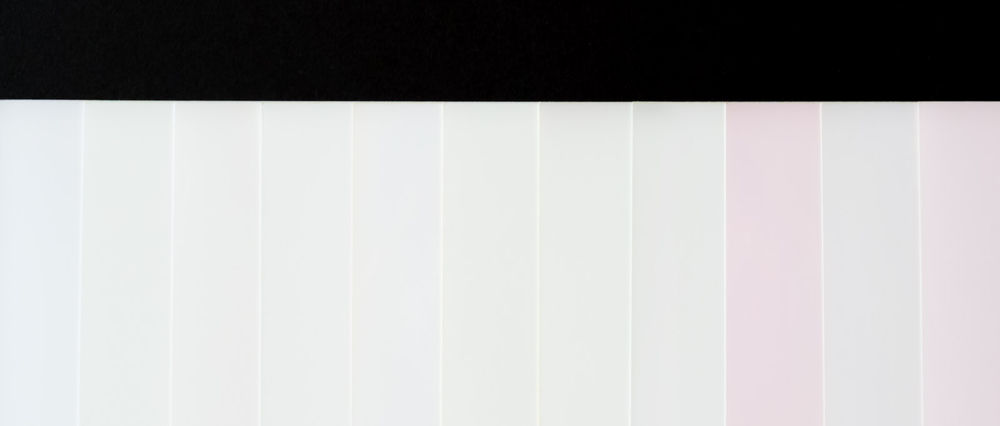
You can clearly see the variation that exists in the value ‘white’.
These were done at retail kiosks, and in some of the extreme cases I was able to take them back and ask for a reprint. Sometimes these reprints were better, sometimes they were exactly the same.
Your Monitor
One thing we haven’t talked about is whether your monitor is actually showing the correct colours.
Monitors are not perfect and will not show every colour accurately so you may get colour shifts in some large parts of your photograph.
Both your monitor and the printer need to be calibrated to a standard in order to get a consistent result.
Conclusion
Those are simple tips you can use to make prints of your day to day life. Printing is a great way to share with grandparents and kids love having something tangible they can keep in their drawer.
Valent Lau provides Children and Family Photography in Sydney. When you’re ready for something extra special, contact us and take your first step towards creating some beautiful heirlooms.